Redesigning Attendance Status for LMS
Redesigning Attendance Status for LMS
Redesigning Attendance Status for LMS
Redesigning Attendance Status for LMS
Redesigning Attendance Status for LMS
Client
Company
Client
Client
Vokraf
Vokraf
Vokraf
Project Type
Project Type
Project Type
Web LMS
Web LMS
Web LMS
Industry
Industry
Industry
Edutech
Edutech
Edutech
Year
Year
Year
2023
2023
2023
Overview
Overview
Overview
The Vokraf Attendance project focuses on improving the clarity and usability of attendance status within a learning management system. The goal was to design a more intuitive experience for students and instructors to understand attendance records at a glance, reducing confusion and improving overall engagement with the platform’s core learning activities.
The Vokraf Attendance project focuses on improving the clarity and usability of attendance status within a learning management system. The goal was to design a more intuitive experience for students and instructors to understand attendance records at a glance, reducing confusion and improving overall engagement with the platform’s core learning activities.
The Vokraf Attendance project focuses on improving the clarity and usability of attendance status within a learning management system. The goal was to design a more intuitive experience for students and instructors to understand attendance records at a glance, reducing confusion and improving overall engagement with the platform’s core learning activities.
The Vokraf Attendance project focuses on improving the clarity and usability of attendance status within a learning management system. The goal was to design a more intuitive experience for students and instructors to understand attendance records at a glance, reducing confusion and improving overall engagement with the platform’s core learning activities.


Background
Background
Background
What is Attendance Status Feature?
Attendance status is a feature that provides updates on Vokraf students' attendance, indicating whether they attended the class or not before joining the live class session on Zoom. This feature is located on Vokraf LMS website.
What is Attendance Status Feature?
What is Attendance Status Feature?
Attendance status is a feature that provides updates on Vokraf students' attendance, indicating whether they attended the class or not before joining the live class session on Zoom. This feature is located on Vokraf LMS website.
Attendance status is a feature that provides updates on Vokraf students' attendance, indicating whether they attended the class or not before joining the live class session on Zoom. This feature is located on Vokraf LMS website.
Attendance status is a feature that provides updates on Vokraf students' attendance, indicating whether they attended the class or not before joining the live class session on Zoom. This feature is located on Vokraf LMS website.
Project Overview
Project Overview
Project Overview
I was tasked with enhancing the existing attendance tracking system for webinar class students on the Vokraf Learning Management System (LMS) page. Our objective was to implement specific rules aligned with the Prakerja Program Management Office (PMO) policy, ensuring that participants who adhered to these rules would have their attendance recorded as "attended" after each class session. This improvement was implemented to address and minimize participant complaints to customer service regarding unchanged attendance status during ongoing live class session, even when they joined the class punctually.
I was tasked with enhancing the existing attendance tracking system for webinar class students on the Vokraf Learning Management System (LMS) page. Our objective was to implement specific rules aligned with the Prakerja Program Management Office (PMO) policy, ensuring that participants who adhered to these rules would have their attendance recorded as "attended" after each class session. This improvement was implemented to address and minimize participant complaints to customer service regarding unchanged attendance status during ongoing live class session, even when they joined the class punctually.
I was tasked with enhancing the existing attendance tracking system for webinar class students on the Vokraf Learning Management System (LMS) page. Our objective was to implement specific rules aligned with the Prakerja Program Management Office (PMO) policy, ensuring that participants who adhered to these rules would have their attendance recorded as "attended" after each class session. This improvement was implemented to address and minimize participant complaints to customer service regarding unchanged attendance status during ongoing live class session, even when they joined the class punctually.
I was tasked with enhancing the existing attendance tracking system for webinar class students on the Vokraf Learning Management System (LMS) page. Our objective was to implement specific rules aligned with the Prakerja Program Management Office (PMO) policy, ensuring that participants who adhered to these rules would have their attendance recorded as "attended" after each class session. This improvement was implemented to address and minimize participant complaints to customer service regarding unchanged attendance status during ongoing live class session, even when they joined the class punctually.
Problems
Problems
Problems
High Complaints in Regards to Ongoing Live Class Session
High Complaints in Regards to Ongoing Live Class Session
High Complaints in Regards to Ongoing Live Class Session
First, we investigated the issue using data from Customer Service. The data included a list of complaints reported by class participants regarding their attendance status during live sessions. Here are the key findings:
First, we investigated the issue using data from Customer Service. The data included a list of complaints reported by class participants regarding their attendance status during live sessions. Here are the key findings:
First, we investigated the issue using data from Customer Service. The data included a list of complaints reported by class participants regarding their attendance status during live sessions. Here are the key findings:
First, we investigated the issue using data from Customer Service. The data included a list of complaints reported by class participants regarding their attendance status during live sessions. Here are the key findings:
Delayed Student Attendance Status Updates During Live Classes
From June 2023 to September 2023, there were complaints from 20% of participants from all classes, stating that they had entered the live class session on Zoom, but their attendance status was not updated before 7:30 PM.
Wrong Profile Name Format on Class Zoom
15% of participants are still incorrect in using the profile name format on Zoom which was defined by Prakerja PMO. This issue could increase the LMS admin’s workload in manually checking the incorrect name.
Delayed Student Attendance Status Updates During Live Classes
From June 2023 to September 2023, there were complaints from 20% of participants from all classes, stating that they had entered the live class session on Zoom, but their attendance status was not updated before 7:30 PM.
From June 2023 to September 2023, there were complaints from 20% of participants from all classes, stating that they had entered the live class session on Zoom, but their attendance status was not updated before 7:30 PM.
Wrong Profile Name Format on Class Zoom
15% of participants are still incorrect in using the profile name format on Zoom which was defined by Prakerja PMO. This issue could increase the LMS admin’s workload in manually checking the incorrect name.
15% of participants are still incorrect in using the profile name format on Zoom which was defined by Prakerja PMO. This issue could increase the LMS admin’s workload in manually checking the incorrect name.
Technical Constraint
Technical Constraint
Technical Constraint
We also found out the issue came from limitation on our back-end tech side, where the system can only update participant attendance 90 minutes after the class starts. This problem led delaying attendance update on user perspective.
We also found out the issue came from limitation on our back-end tech side, where the system can only update participant attendance 90 minutes after the class starts. This problem led delaying attendance update on user perspective.
We also found out the issue came from limitation on our back-end tech side, where the system can only update participant attendance 90 minutes after the class starts. This problem led delaying attendance update on user perspective.
We also found out the issue came from limitation on our back-end tech side, where the system can only update participant attendance 90 minutes after the class starts. This problem led delaying attendance update on user perspective.
Identifying the Issue on Existing Attendance Status Page
Identifying the Issue on Existing Attendance Status Page
Identifying the Issue on Existing Attendance Status Page
After getting briefed with Associate Product Manager and UI/UX Lead about the problem and user journey explanation, I thoroughly checked the specific interface where users might not aware on why their attendance status had not changed during ongoing live class session. Here is the existing UI and explanation.
After getting briefed with Associate Product Manager and UI/UX Lead about the problem and user journey explanation, I thoroughly checked the specific interface where users might not aware on why their attendance status had not changed during ongoing live class session. Here is the existing UI and explanation.
After getting briefed with Associate Product Manager and UI/UX Lead about the problem and user journey explanation, I thoroughly checked the specific interface where users might not aware on why their attendance status had not changed during ongoing live class session. Here is the existing UI and explanation.
After getting briefed with Associate Product Manager and UI/UX Lead about the problem and user journey explanation, I thoroughly checked the specific interface where users might not aware on why their attendance status had not changed during ongoing live class session. Here is the existing UI and explanation.

Exploring Solutions
Exploring Solutions
Exploring Solutions
Discussing The Choice of Tone
Discussing The Choice of Tone
Discussing The Choice of Tone
At that time, I discussed with design team changing the copy tone and layout on the existing page to give "modernized" impression for user. The considerations of the discussion are as follows:
At that time, I discussed with design team changing the copy tone and layout on the existing page to give "modernized" impression for user. The considerations of the discussion are as follows:
At that time, I discussed with design team changing the copy tone and layout on the existing page to give "modernized" impression for user. The considerations of the discussion are as follows:
Semi-casual Writing Tone
Semi-casual Writing Tone
Semi-casual Writing Tone
Most users are Millennials and Gen Z. We believe using an informal tone creates a friendly, approachable feel and reduces intimidation.
Most users are Millennials and Gen Z. We believe using an informal tone creates a friendly, approachable feel and reduces intimidation.
Most users are Millennials and Gen Z. We believe using an informal tone creates a friendly, approachable feel and reduces intimidation.
Highlight Important Message
Highlight Important Message
Highlight Important Message
Enhancing visual cues through the use of bold text, color, and formatting helps direct users' attention to the most important content.
Enhancing visual cues through the use of bold text, color, and formatting helps direct users' attention to the most important content.
Enhancing visual cues through the use of bold text, color, and formatting helps direct users' attention to the most important content.
Delving into Attendance Status Information
Delving into Attendance Status Information
Delving into Attendance Status Information
Prakerja requires participants to follow 3 main rules in order to accept the attendance, which are:
Participation in a group photo at the end of the class session.
Zoom profile name according to the format requirements of Prakerja
Listen carefully to the instructions provided by the instructor's assistant.
Prakerja requires participants to follow 3 main rules in order to accept the attendance, which are:
Participation in a group photo at the end of the class session.
Zoom profile name according to the format requirements of Prakerja
Listen carefully to the instructions provided by the instructor's assistant.
Prakerja requires participants to follow 3 main rules in order to accept the attendance, which are:
Participation in a group photo at the end of the class session.
Zoom profile name according to the format requirements of Prakerja
Listen carefully to the instructions provided by the instructor's assistant.
Prakerja requires participants to follow 3 main rules in order to accept the attendance, which are:
Participation in a group photo at the end of the class session.
Zoom profile name according to the format requirements of Prakerja
Listen carefully to the instructions provided by the instructor's assistant.
With that in mind, we wanted to emphasize important messages to participants with our tone, so they will be aware of attendance checking during the class session
With that in mind, we wanted to emphasize important messages to participants with our tone, so they will be aware of attendance checking during the class session
With that in mind, we wanted to emphasize important messages to participants with our tone, so they will be aware of attendance checking during the class session
With that in mind, we wanted to emphasize important messages to participants with our tone, so they will be aware of attendance checking during the class session
How might we communicate the important rules and the right time to check attendance status to participants? Here are the design exploration
How might we communicate the important rules and the right time to check attendance status to participants? Here are the design exploration
How might we communicate the important rules and the right time to check attendance status to participants? Here are the design exploration
How might we communicate the important rules and the right time to check attendance status to participants? Here are the design exploration

Image: Attendance status component exploration
Image: Attendance status component exploration
Image: Attendance status component exploration
Final Design
Final Design
Final Design
Deciding Visual Improvement on Attendance Status Page
Deciding Visual Improvement on Attendance Status Page
Deciding Visual Improvement on Attendance Status Page
After several discussions with CPO, APM, and Full Stack Engineer, we had several adjustments on design and microcopy. The feedbacks were quite beneficial which can improve clarity, even to small details.
After several discussions with CPO, APM, and Full Stack Engineer, we had several adjustments on design and microcopy. The feedbacks were quite beneficial which can improve clarity, even to small details.
After several discussions with CPO, APM, and Full Stack Engineer, we had several adjustments on design and microcopy. The feedbacks were quite beneficial which can improve clarity, even to small details.
After several discussions with CPO, APM, and Full Stack Engineer, we had several adjustments on design and microcopy. The feedbacks were quite beneficial which can improve clarity, even to small details.
New Attendance Status Information
New Attendance Status Information
New Attendance Status Information
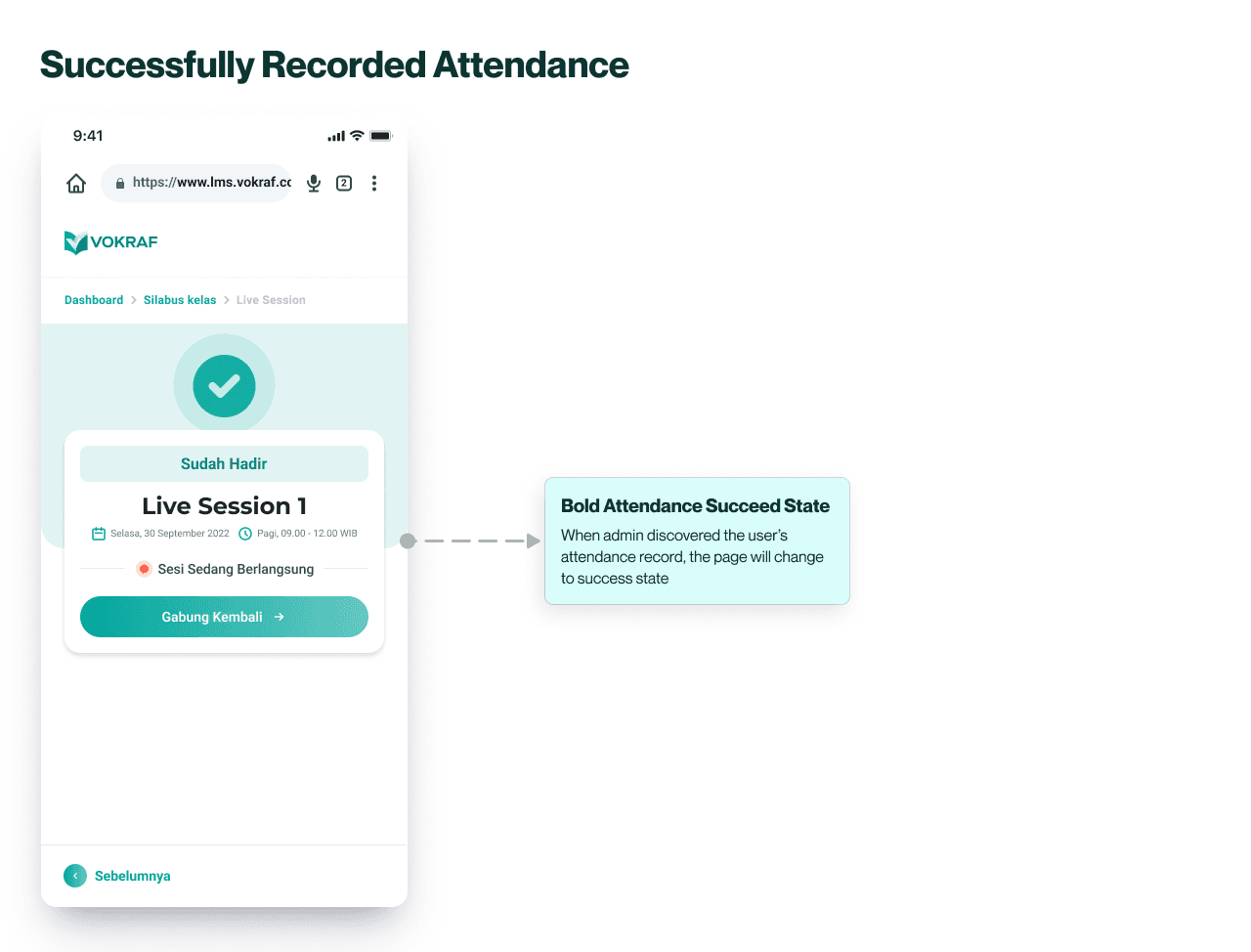
These user interface offers three user conditions, including:
Incorrect Profile Name - Occurs when users mistakenly input the profile name on Zoom.
Attendance Verification - Appears when users check attendance status at the beginning of a class session.
Recorded Attendance - Displayed 90 minutes after the class session starts if users correctly input their names.
These user interface offers three user conditions, including:
Incorrect Profile Name - Occurs when users mistakenly input the profile name on Zoom.
Attendance Verification - Appears when users check attendance status at the beginning of a class session.
Recorded Attendance - Displayed 90 minutes after the class session starts if users correctly input their names.
These user interface offers three user conditions, including:
Incorrect Profile Name - Occurs when users mistakenly input the profile name on Zoom.
Attendance Verification - Appears when users check attendance status at the beginning of a class session.
Recorded Attendance - Displayed 90 minutes after the class session starts if users correctly input their names.
These user interface offers three user conditions, including:
Incorrect Profile Name - Occurs when users mistakenly input the profile name on Zoom.
Attendance Verification - Appears when users check attendance status at the beginning of a class session.
Recorded Attendance - Displayed 90 minutes after the class session starts if users correctly input their names.

Responsive Web Design
Responsive Web Design
Responsive Web Design
Adhering to Desktop Size
Adhering to Desktop Size
Adhering to Desktop Size
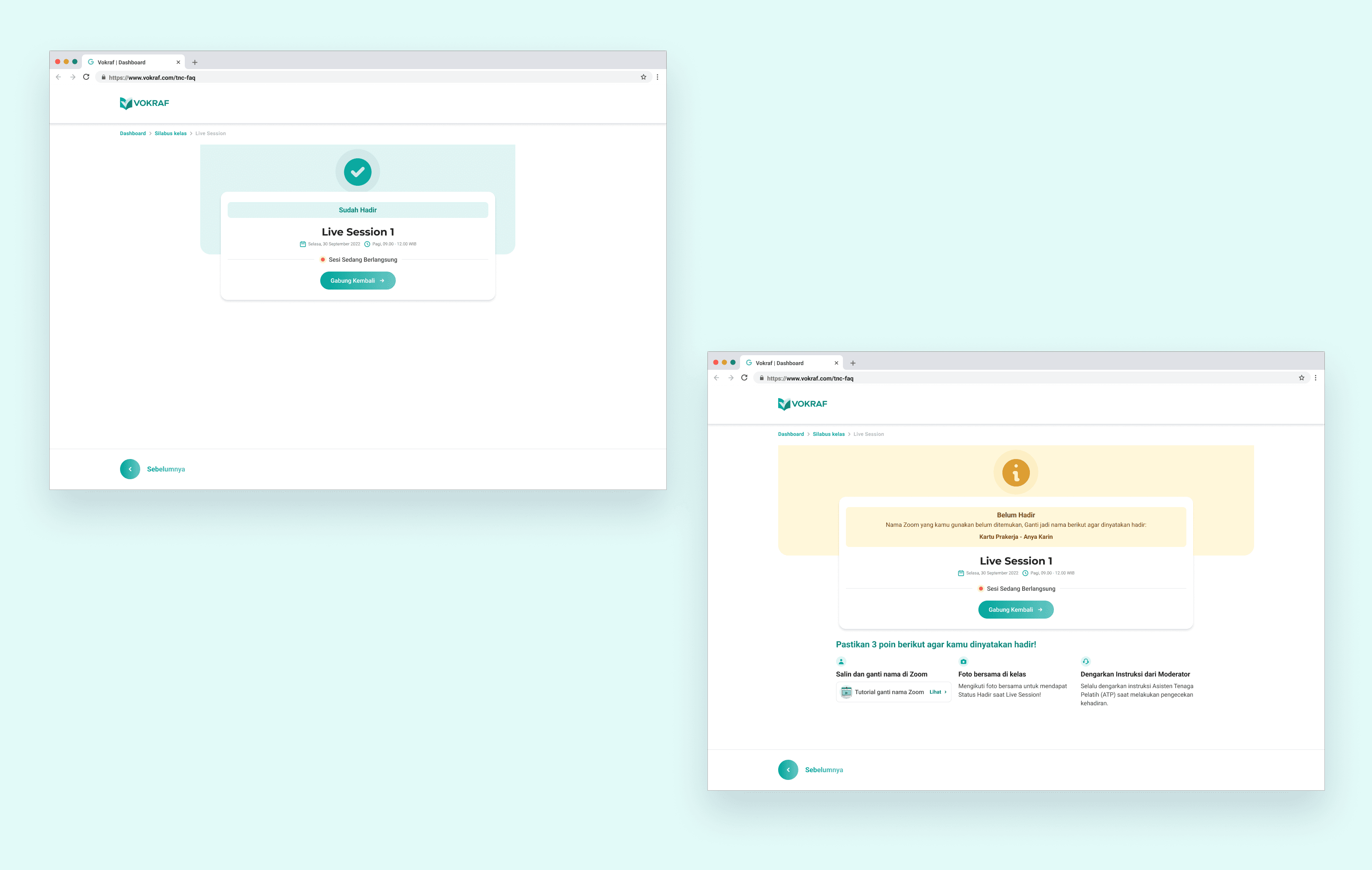
Once we finalized the mobile design, we thought it made sense to stick with a similar layout for the desktop version. This way, we keep things consistent, make it easy to scale, and speed up the development process.
Once we finalized the mobile design, we thought it made sense to stick with a similar layout for the desktop version. This way, we keep things consistent, make it easy to scale, and speed up the development process.
Once we finalized the mobile design, we thought it made sense to stick with a similar layout for the desktop version. This way, we keep things consistent, make it easy to scale, and speed up the development process.
Once we finalized the mobile design, we thought it made sense to stick with a similar layout for the desktop version. This way, we keep things consistent, make it easy to scale, and speed up the development process.
Results
Results
Results
Drop in User Complaints and Reduced Errors in Using Profile Names
Drop in User Complaints and Reduced Errors in Using Profile Names
Drop in User Complaints and Reduced Errors in Using Profile Names
One month after the deployment of an improvement, we assessed four class batches and observed a significant reduction in user complaints regarding attendance status, dropping to just 6%. This improvement impacted all classes, leading to a noteworthy decrease in user-reported issues. Notably, users were effortlessly rectify profile name discrepancies on their own, eliminating the hassle associated with such corrections.
One month after the deployment of an improvement, we assessed four class batches and observed a significant reduction in user complaints regarding attendance status, dropping to just 6%. This improvement impacted all classes, leading to a noteworthy decrease in user-reported issues. Notably, users were effortlessly rectify profile name discrepancies on their own, eliminating the hassle associated with such corrections.
One month after the deployment of an improvement, we assessed four class batches and observed a significant reduction in user complaints regarding attendance status, dropping to just 6%. This improvement impacted all classes, leading to a noteworthy decrease in user-reported issues. Notably, users were effortlessly rectify profile name discrepancies on their own, eliminating the hassle associated with such corrections.
One month after the deployment of an improvement, we assessed four class batches and observed a significant reduction in user complaints regarding attendance status, dropping to just 6%. This improvement impacted all classes, leading to a noteworthy decrease in user-reported issues. Notably, users were effortlessly rectify profile name discrepancies on their own, eliminating the hassle associated with such corrections.


(Contact)
Let’s collaborate.
(Contact)
Let’s collaborate.
(Contact)
Let’s collaborate.
(Contact)
Let’s collaborate.
(Contact)
Let’s collaborate.
-
-
-
-
-
2023
2023
2023
2023
2023